


Clipboard - Workers
4.31.45K Reviews
App Specs
- Version
- 2.269.1
- Updated On
- License
- Free
- Downloads
- 500,000+
- Developer
- Clipboard Works
- Categories
- Business
- Platform
- Android, iOS
Screenshots

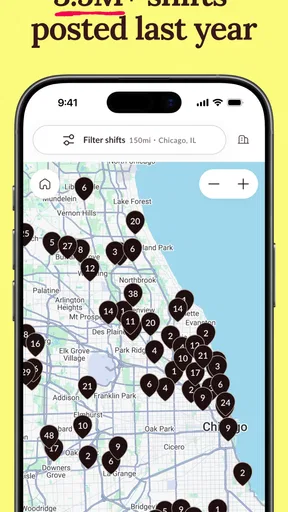


 Analysis by AppCompare
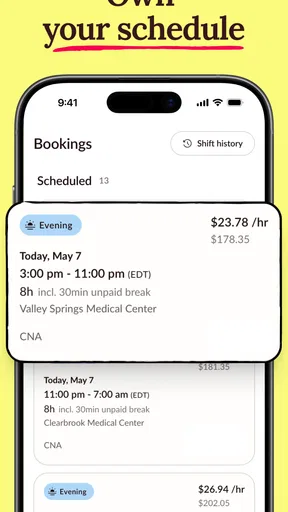
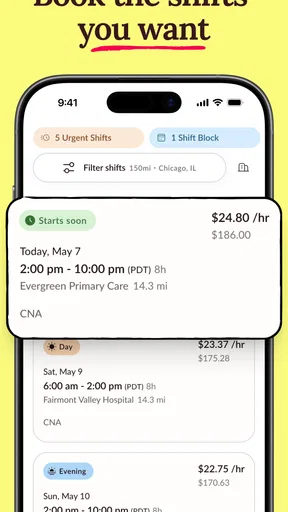
I found Clipboard - Workers most useful as a practical shift-booking tool rather than a full workplace management system. Its central idea is simple: workers can look for available shifts and fit them around their existing commitments. That focus gives the app a clear purpose, and in my experience it is most valuable when your working pattern changes from week to week.
The app belongs to the business category and is developed by Clipboard Works. It is free to use, carries an Everyone age rating, and has built a solid audience with more than 500 thousand installs. Its average score is 4.3 from roughly 5.7 thousand ratings, which suggests that many people find the basic booking workflow useful, while also leaving room for the kind of individual frustrations that can appear in shift-based work.
How Clipboard - Workers fits into real shift work
The main strength is that it puts the worker’s schedule at the center. Instead of treating availability as a fixed weekly pattern, Clipboard lets you approach work more selectively: check what is available, decide whether it fits, and book according to your own plans. That is a meaningful difference from a traditional rota handed out by a manager.
I can see the app fitting especially well into a realistic everyday situation. Imagine working several casual shifts while studying, caring for family, or holding another job. A shift becomes available for a day when you are free, so you open the app, review it, and choose whether taking it makes sense. The value is not just seeing a vacancy; it is having a more direct way to match work opportunities with the hours you actually control.
That flexibility is also the reason I would not describe it as a universal replacement for every scheduling system. If you already have a stable employer, a fixed rota, and little choice over your hours, an ordinary calendar or workplace messaging group may be quicker. Clipboard - Workers makes more sense when the worker needs to make active decisions about shifts rather than simply receive instructions.
The booking workflow rewards regular checking
One practical lesson from using this kind of app is that availability and personal availability are not the same thing. Before booking, I would compare the shift with travel time, existing commitments, and the possibility that a previous shift might run late. The app can make selection easier, but it cannot remove the responsibility of choosing work you can realistically attend.
I also found that the best habit is to check the app at a predictable point in the day instead of waiting until you suddenly need work. That approach gives you more time to think about the shift and reduces the chance of accepting something impulsively. For workers with changing schedules, Clipboard works better as part of a routine than as an emergency-only tool.
Worth Reading Before You Choose

EA SPORTS FC Mobile 26 Is a Bigger Football Game, but It Takes Time

Flipboard Shows What News Apps Must Do Beyond the Feed

Switching to Android Auto Means Rethinking Your Driving Routine

Google Calendar Makes a Crowded Week Easier to Manage

Ludo King Makes the Most of the Minutes Between Plans

Baby Panda World Brings Quick Play to Modern Phones, but Its Game Library Feels Busy
A second useful habit is to keep a separate personal calendar alongside it. Clipboard is designed around booking shifts, while a personal calendar is better for seeing appointments, travel, study, and family commitments together. Using both avoids a common mistake: treating an apparently open day as completely free when it already contains smaller obligations.
Why the focused design can be better than general alternatives
Many people try to manage irregular work through text messages, email threads, spreadsheets, or a general calendar. Those methods can work, but they scatter the information. A message may contain the shift details, a calendar may contain your private plans, and a spreadsheet may be difficult to keep current. Clipboard - Workers has a more direct relationship with the act of finding and booking work.
That focus is its clearest advantage. I do not need a broad project-management tool when my immediate question is, “Which shift can I take?” A general calendar can remind me about a shift after I have accepted it, but it does not provide the same worker-oriented starting point. Conversely, if I need detailed task assignments, team chat, time tracking, payroll management, or long-term planning, a broader workplace platform may be more appropriate.
The trade-off is that a focused app can feel limited when your needs expand beyond shift selection. I would not choose Clipboard as the only tool for managing a complicated professional operation. For an individual worker trying to control availability, however, that narrower scope keeps the purpose understandable.
Small decisions that make the app more useful
My first recommendation is to decide your limits before opening the shift list. Set a personal rule about the earliest start, latest finish, acceptable travel, or days you want to protect. Without those boundaries, the convenience of quick booking can encourage choices that look attractive in isolation but create a tiring week.
My second recommendation is to treat every booking as a commitment, not a tentative bookmark. A flexible schedule is helpful only when it remains dependable for the people expecting you. If you are uncertain about transport or another appointment, I would resolve that first rather than book and hope the conflict disappears.
A third insight is that the app is particularly useful for comparing opportunity against energy, not just opportunity against time. Two shifts may both fit your calendar, but one may follow a demanding day or create a difficult sequence of early starts. Clipboard can help you identify available work, while the final judgment still needs to come from your broader weekly plan.
There is also a useful distinction between short-term convenience and long-term stability. Booking individual shifts can give you control, but it may not provide the predictability of a permanent schedule. Workers who need consistent income or guaranteed hours should think carefully about whether flexibility is worth that uncertainty. The app can support a flexible work pattern; it cannot turn flexible work into fixed employment.
What the experience does not solve
The most important limitation is that a booking app cannot answer every question a worker has about a shift. Before accepting work, I would still want to understand the location, timing, practical expectations, and how the shift fits with my own arrangements. The act of booking may be straightforward, but the decision behind it should not be rushed.
This matters particularly for people who travel a long distance or depend on limited public transport. A shift that looks suitable on paper may be much less appealing once the full journey is considered. I would use Clipboard alongside a map and my own calendar rather than assuming that the booking screen represents the complete cost of accepting work.
Another point of friction is the need for personal discipline. The app can organize the opportunity, but it does not automatically make an irregular schedule easy. You still need to remember what you booked, prepare for it, and protect enough rest between commitments. For someone who wants a system that manages every aspect of work with minimal input, this may feel too hands-on.
I also think the app is less compelling for workers whose employer already provides a reliable scheduling process. If your manager sends a clear rota, changes are communicated quickly, and your hours are predictable, adding another place to check may create duplication rather than convenience. In that situation, Clipboard is worth considering only if it gives you access to additional shifts or more control than your current arrangement.
Who should use it, and who should look elsewhere
I would recommend Clipboard - Workers to people who actively want to choose shifts around their lives. It is a strong fit for casual workers, people with changing weekly availability, and anyone who values the ability to inspect work opportunities before committing. It is also sensible for someone who dislikes relying on scattered messages to keep track of possible shifts.
The app is less suitable for someone seeking a complete employment dashboard. If your priority is payslip access, detailed attendance records, team communication, expense management, or long-range workforce planning, you may need a different business tool or an employer-provided system. Clipboard’s appeal comes from its worker-facing shift focus, not from trying to cover every administrative need.
I would also be cautious if you are easily tempted to accept more work than you can comfortably handle. The convenience of browsing and booking can be positive, but flexibility can become overcommitment. A simple weekly review can help: check the shifts you have accepted, add travel and preparation time, and then decide whether the next booking genuinely fits.
For new users, the sensible approach is to start slowly. Review the available work, compare it with your real schedule, and book only shifts you understand and can attend. After that, keep your personal calendar updated and check for conflicts before accepting anything else. This workflow makes the app a planning aid instead of a source of last-minute pressure.
Practical details and overall value
Clipboard - Workers is free, which makes it easy to try without adding a subscription decision to the process. It was released on November 25, 2019, and the current version is 2.269.1. The Android requirement is version 7.0 or later, so it is accessible on many devices that are not especially new.
The age rating is Everyone, which matches the straightforward nature of a business scheduling app. I would still judge it by whether its workflow suits your employment situation rather than by the low barrier to installation. Free access is useful, but the real question is whether it saves you enough effort compared with your current method.
The developer, Clipboard Works, has kept the product’s identity clear: this is for workers who want to book shifts on their own schedule. That clarity is a strength because I quickly understand what problem it is trying to solve. It is also a limitation because anyone expecting a broad suite of workplace tools may find the experience narrower than expected.
After using it as a shift-focused tool, my view is favorable but specific. I like the way it encourages workers to take an active role in choosing work, and I prefer that focus to a cluttered app trying to handle unrelated business tasks. At the same time, I would never let the convenience of booking replace careful planning around travel, rest, income needs, and existing commitments.
My final recommendation is simple: choose Clipboard - Workers if your main challenge is finding and selecting shifts that fit an unpredictable life. It is a practical choice for flexible workers who are comfortable making their own scheduling decisions. Skip it if you already have a dependable fixed rota or need a complete employment-management platform.
Pros
- Quickly saves copied text for later use
- Useful for organizing work-related snippets
- Simple interface is easy to navigate
- Helps reduce repeated typing
- Makes frequently used information easier to access
Cons
- May require permissions to monitor clipboard content
- Sensitive copied data could pose a privacy risk
- Features may feel limited for advanced users
- Clipboard history can become cluttered over time
- Compatibility may vary across Android and iOS devices
FAQs for Clipboard - Workers
What is Clipboard - Workers and who is it designed for?
Clipboard - Workers is a productivity tool intended to help employees, contractors, and field teams manage copied information and work-related notes more efficiently. It can be useful when you frequently move text, links, codes, addresses, or instructions between apps. Before downloading, check whether its features match your workflow, as the usefulness of a clipboard manager depends on the type of tasks you perform and the permissions required by your device.
How does Clipboard - Workers handle copied text and other information?
The app is designed to make recently copied content easier to access, organize, and reuse instead of forcing you to switch repeatedly between applications. Depending on your device and configuration, clipboard history may include text, links, or other supported content. Users should avoid copying passwords, payment details, private customer information, or confidential company data unless they have reviewed the app’s privacy practices and security options.
Is Clipboard - Workers safe to use with professional or sensitive information?
Clipboard tools can improve productivity, but they may also handle information that remains temporarily stored on the device. For workplace use, review the application’s privacy policy, data collection disclosures, storage behavior, and available deletion controls before relying on it. It is best to keep sensitive credentials and confidential documents out of clipboard history and to use any lock, clearing, or privacy settings provided.
Does Clipboard - Workers require special permissions or accessibility access?
The permissions requested by Clipboard - Workers may vary according to the operating system and the features enabled. Clipboard-related apps can require access that allows them to detect or manage copied content, while some advanced functions may involve background activity or accessibility-related settings. Read each permission prompt carefully, grant only what is necessary, and remember that restricting permissions can limit how reliably the app works.
Can Clipboard - Workers be used offline, and is it free to download?
Basic clipboard functions may work without an internet connection when information is stored locally, although features such as synchronization, account services, updates, or workplace sharing could require connectivity. Availability of free features, advertisements, subscriptions, or in-app purchases can differ between Android and iOS versions. Check the current store listing before downloading so you understand the pricing, supported devices, and any limitations.


